Docs / Getting started
How frogQuiz works
You make a quiz, one person hosts it, and everyone else answers on their own phone. The host runs the game and sees the room's results. Players join with the game's PIN; they do not need to make an account just to play.
Make a quiz
Open My Quizzes and select Create a quiz. There are three ways in:
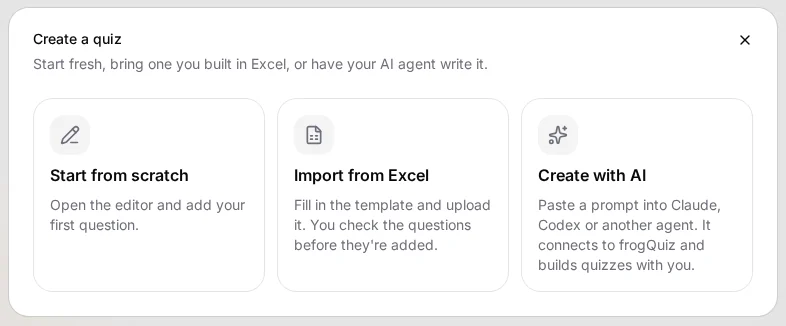
- Start from scratch: open the editor and write your first question.
- Import from Excel: upload a workbook and review the questions before creating the quiz. Excel guide.
- Create with AI: connect an agent that can build and edit quizzes in your account. AI agent guide.
The AI option appears only if the server has agents enabled, and it requires an account. If guest creation is off, you will be asked to sign in before creating or importing.
Edit and check
In the editor, give the quiz a title, add questions, set the correct answers for scored questions, and save it. Use a mix of question types rather than treating every round as a multiple-choice test:
- Multiple choice, True or False, and Type answer: knowledge checks.
- Slider: numerical guesses.
- Put in order: sequences, timelines and processes.
- Poll, Ranking and Word cloud: opinions or discussion, without right answers.
- Info slide: give context or introduce the next round.
Open a quiz from My Quizzes to review it before you host. You can also use Practice to answer questions without running a live room.
Host a live game
- Open your quiz and choose Host game to start the hosting flow.
- Share the PIN shown in the lobby. Players join on their phones and choose a nickname.
- Start the game, move through questions and watch the answers and scoreboard. At the end, the podium and recap show how everyone did.
For a group in one room, put the host screen on a TV or projector, and let players answer on their phones. Hosting directly from a phone mirrored to a TV also works, although very long questions can still require scrolling on a small landscape screen.
Find, keep and share your quizzes
My Quizzes is where you find quizzes you made. Guests can make quizzes in a browser when guest creation is enabled, but those quizzes expire after 30 days and browser data can remove access. Sign in and add them to your account if you want to keep them.
A Public quiz can appear in Discover. A Link only quiz is absent from Discover, but anyone with its link can view it. Where Private is enabled, a Private quiz can be opened only by its signed-in owner. Check the visibility setting before sharing anything sensitive.
What people use frogQuiz for
Pub quizzes and parties
Build themed rounds, add a quick poll, and finish with a podium.
Classrooms and workshops
Check understanding, sequence steps with Put in order, or collect a word cloud.
Team meetings and training
Turn a question bank into an Excel quiz, then run it live with the group.
Feedback and discussion
Use polls and ranking to see what the room thinks without treating opinions as correct or incorrect.
Where to go next
Prepare a quiz in Excel if you already have questions in a sheet. Or see AI agents if you want an assistant to make or edit quizzes for you. Both routes still leave you in control of what gets played.